
When I first added AI to my site, I did what most people do. I picked one model, put the key in appsettings, and sent everything to it. Chat replies, cover letters, interview questions, all of it went to the same place.
It worked. But it didn't take long to see the problem: my tasks are not the same, so why should they all use the same model?
A reply to a visitor in the chat box and a cover letter that goes to an employer under my name are very different jobs. One needs to be fast and cheap because anyone on the internet can trigger it. The other runs maybe twice a week and has to be really good. Using one model for both means I'm either overpaying for the chat or under-serving the cover letter.
So I changed my app. Today every AI task on dhakalsangam.com.np can have its own model, with a fallback chain, and I change it from an admin page without redeploying. This post shows how it works and how I decide which model goes where.
What I look at when choosing a model
Before I pick a model for a task, I ask a few simple questions:
| Question | Why it matters |
|---|---|
| How good must the answer be? | A wrong interview answer teaches me the wrong thing. A slightly plain chat reply is fine. |
| Who can trigger it? | If only I use it, cost is predictable. If any visitor can trigger it, it needs to be cheap. |
| How often does it run, and how many tokens? | Background jobs like rolling summaries run all the time. A cover letter runs rarely. |
| How fast must it respond? | Someone waiting in a chat box notices every second. A background job doesn't. |
| What happens if it fails? | Some tasks can quietly use a backup model. Some should just retry later. |
Once I answered these for each feature, it was obvious that "one model for everything" was the wrong design.
How it looks in my app
The admin page has two parts. The first is Connections & models: the providers I'm connected to and the models under each one.
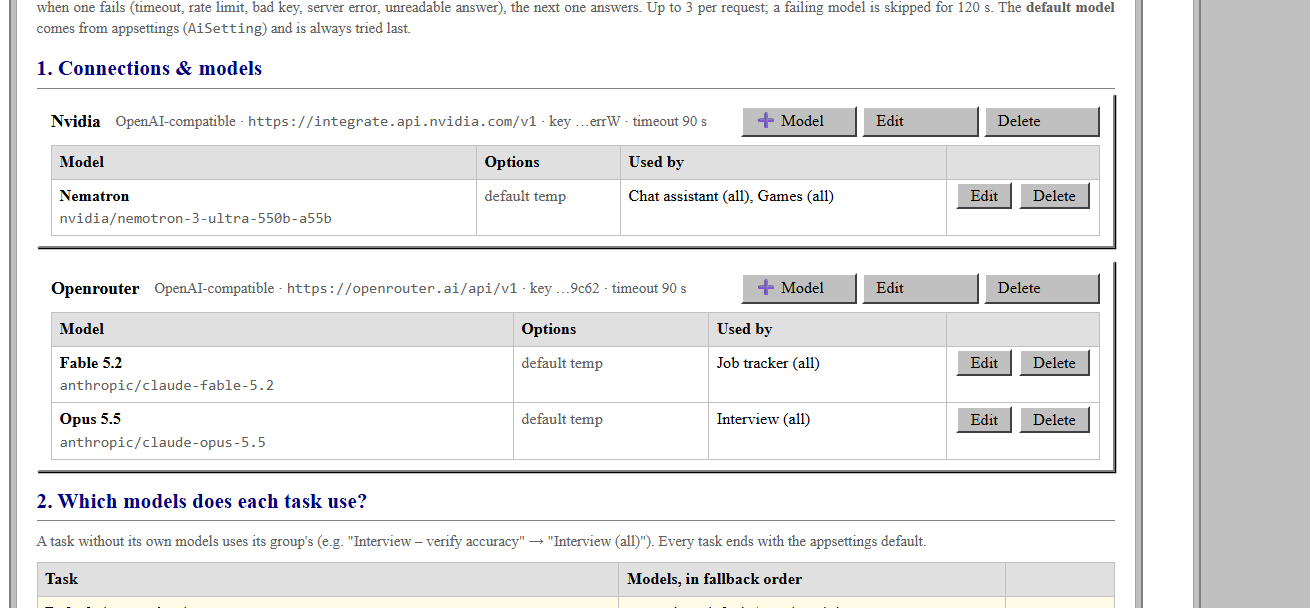
A connection is just an OpenAI-compatible endpoint: a base URL, an API key and a timeout. Right now I have two:
- NVIDIA (
https://integrate.api.nvidia.com/v1) with Nemotron 3 Ultra (nvidia/nemotron-3-ultra-550b-a55b). - OpenRouter (
https://openrouter.ai/api/v1) with Claude Fable 5.2 and Claude Opus 5.5.
Each model row can have its own options, like temperature, and a Used by column so I can see at a glance which features depend on it. That column is surprisingly useful. Before I delete or change a model, I know exactly what it will affect.
There's also a default model, gpt-4o-mini. It isn't configured on this page at all. It lives in appsettings (or user secrets and environment variables) under AiSetting. I did this on purpose: even if the database config is broken or I delete every model by mistake, the app still has one working model to fall back on.
Which model does each task use?
The second part maps tasks to models.
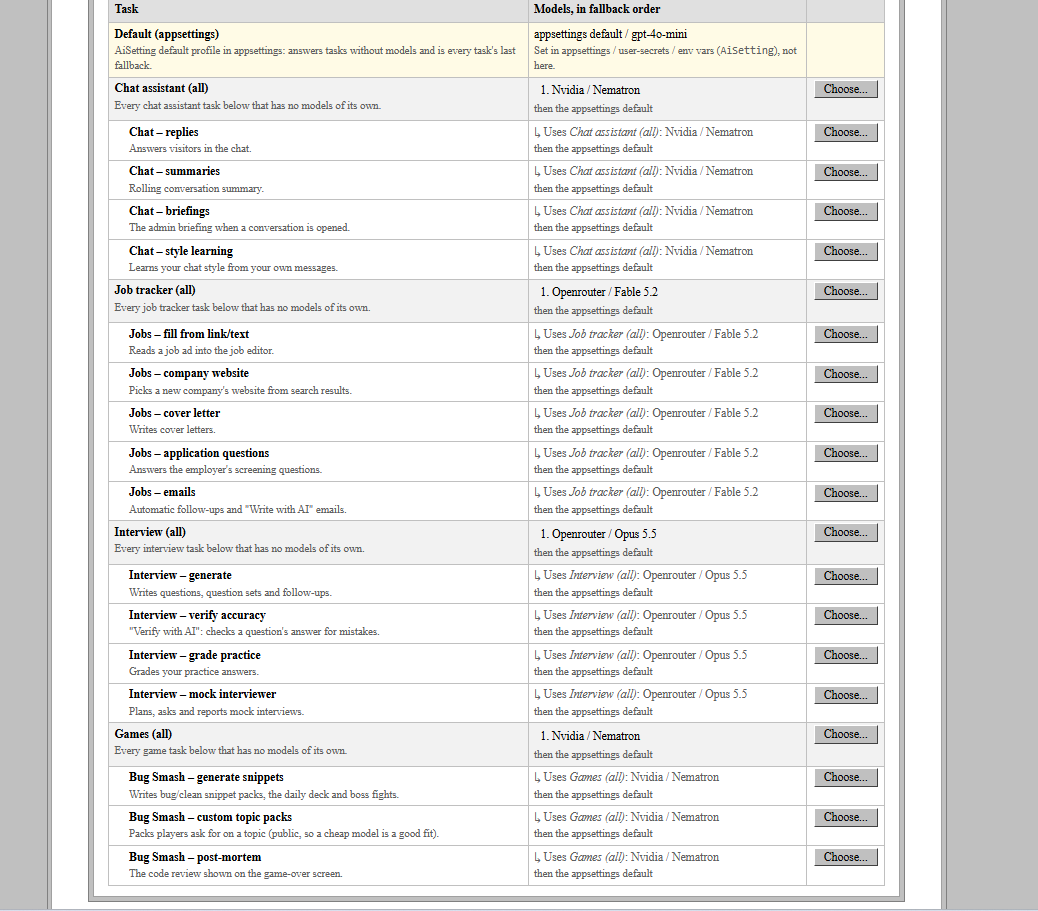
Tasks are grouped by feature: Chat assistant, Job tracker, Interview and Games. Each group has an "(all)" row, and every task inside it uses the group's models unless I give it its own. For example, Interview – verify accuracy has nothing set, so it uses Interview (all). And every task ends with the appsettings default.
This keeps the setup simple. I set four group-level choices, and I only override a single task when it really needs something different.
Here's how I've set it up today, and why.
Chat assistant → Nemotron on NVIDIA
The chat assistant answers visitors on my site, keeps a rolling summary of each conversation, gives me a briefing when I open a conversation in admin, and learns my chat style from my own messages.
This is the highest volume and most public feature. Anyone can open the chat and send messages, and the summary and style tasks run in the background on top of that. It needs to be quick and it needs to be cheap. A large open model on NVIDIA does a good job here. Chat replies don't need the strongest model I have, and I don't want a stranger's long conversation burning my best model's tokens.
Job tracker → Claude Fable 5.2
The job tracker reads a job ad from a link or pasted text, finds the company's website, writes cover letters, answers screening questions and drafts follow-up emails.
This is the opposite of the chat. Only I use it, it runs a few times a week, and almost everything it writes goes to an employer with my name on it. A weak cover letter or a sloppy screening answer can cost me an interview. So this group gets the most capable model I have connected. The volume is low, so the cost stays reasonable even with a top model.
Interview → Claude Opus 5.5
My interview prep feature writes questions and follow-ups, verifies that an answer is accurate, grades my practice answers and runs mock interviews.
Here the key word is accuracy. If the model writes a wrong answer into my question bank, or grades my answer as correct when it isn't, I'm practising the wrong thing for a real interview. I want strong reasoning and careful technical answers, so this group uses Opus 5.5. Again, only I use it, so volume is small.
Bug Smash game → Nemotron
Bug Smash is a small game on my site where developers spot buggy vs clean code snippets. The AI generates snippet packs, the daily deck and boss fights, builds custom topic packs that players ask for, and writes a short code review on the game-over screen.
The custom topic packs are public: any player can request one. That's exactly the kind of task where a cheap model is the right choice. The snippets are short and the format is fixed, so a large open model handles it well.
The default → gpt-4o-mini
The default is cheap, fast and reliable. It's not the best writer, but it's good enough to keep a feature working while the main model is down. It's my safety net, not my first choice.
Fallback: when a model fails
Having more than one model also means I can survive failures. Free tiers hit rate limits, providers have outages, and keys expire.
The rules in my app are simple:
- If a model fails, the next one in the list answers. "Fails" means a timeout, a rate limit, a bad key, a server error or an unreadable answer (for example, I asked for JSON and got something I can't parse).
- Up to 3 attempts per request, so one bad request can't loop forever.
- A model that fails is skipped for 120 seconds, so I don't keep hitting a provider that's clearly down.
- The appsettings default is always tried last.
Here's a simplified version of the idea in C#, using IChatClient from Microsoft.Extensions.AI:
public async Task<ChatResponse> AskAsync(
    string task, IList<ChatMessage> messages, CancellationToken ct)
{
    // The task's own models, else its group's models, then the appsettings default
    var candidates = _routing.GetModelsFor(task)
        .Where(m => !_cooldown.IsSkipped(m.Id))
        .Append(_defaultModel)
        .Take(MaxAttempts);

    foreach (var model in candidates)
    {
        try
        {
            var client = _clients.For(model);   // OpenAI-compatible client for that connection
            var response = await client.GetResponseAsync(messages, model.Options, ct);

            if (IsUsable(response))             // empty or unparseable = a failure
                return response;
        }
        catch (Exception ex) when (IsProviderFailure(ex)) // timeout, 429, 401, 5xx
        {
            _logger.LogWarning(ex, "{Model} failed for {Task}", model.Id, task);
        }

        _cooldown.Skip(model.Id, TimeSpan.FromSeconds(120));
    }

    throw new AiUnavailableException(task);
}
The feature code never knows which model answered. It just asks for "Jobs – cover letter" or "Chat – replies" and gets a response.
Why OpenAI-compatible APIs make this easy
All of this is possible because most providers now speak the same API shape. NVIDIA, OpenRouter and OpenAI all accept the same chat request, so adding a provider is just a new base URL and key. No new SDK, no new code.
OpenRouter is especially handy. One key gives me access to Claude and many other models, so trying a new model for a task is a two-minute change on the admin page.
What I've learned
- Start with the task, not the model. Ask what the task needs first: quality, speed, volume, who can trigger it. Then pick the model.
- Public features get cheaper models. If anyone on the internet can trigger it, assume someone will trigger it a lot.
- Spend on what carries your name. For me that's cover letters and anything an employer reads.
- Keep a boring default outside the database. When everything else breaks, the app should still answer.
- Make it a config change, not a deploy. New models come out every few months. I don't want to redeploy every time I want to try one.
- Keep the feature code model-agnostic. If a feature knows the model's name, it's too tightly coupled.
Final thoughts
Using one model for everything is a fine way to start. But once an app has a few AI features, it's worth treating the model as a per-task decision, just like you'd choose the right database or cache for each job.
For my site, that means a large open model for the busy public features, Claude for the work that matters most to me, and a cheap, reliable default holding it all together.
How are you choosing models in your apps? Do you use one model for everything, or do you route tasks to different ones? Let me know in the comments.



Comments (0)
🔑 Log in to comment Sign in with your email to like, save and join the discussion.
No comments yet. Be the first!